

Students
Have you ever read a paragraph over and over trying to understand what you are reading? Are there times when you would like to listen to your course materials while exercising or commuting?
We have an exciting new learning tool in Brightspace (D2L), Yuja Panorama!
Panorama easily transforms your course content into a format that meets your learning needs in a way that works for you.
Options to access your course readings include:
- Audio Podcast – Learn by listening.
- HTML – Create a web version for your mobile devices.
- Selectable Text PDF – Turn that scanned PDF into one you can highlight and interact with.
- EPUB – Read using your eReader or tablet.
- Gradient Reader – Read faster by using color gradients.
- Math Formats - alternative formats for math and science content.
To Get Started
Select the alternative formats icon (person inside a circle) next to each course file to get started.
Image
Choose the format that works best for you, and download.
Image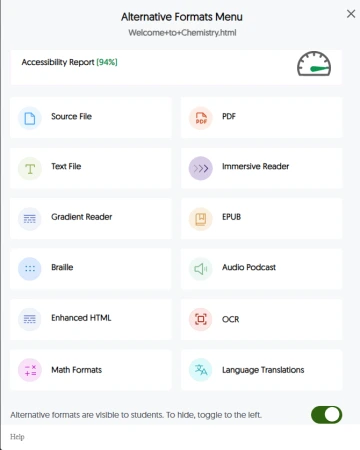
Format options defined:
- Source File: View the document in its original format, suitable for download viewing.\
- PDF: View the document in PDF format, suitable for both online and download viewing.\
- Text File: View the document in a pure text format without any formatting styles, suitable for both online and download viewing.
- Immersive Reader: Allows for customizations to text preferences, grammar options, and reading preferences while following along with the audio playback.
- Gradient Reader: Enhances visual word recognition when reading by providing a guiding color gradient.
- EPUB: View the document in the ebook format, suitable for any ebook reader application.
- Braille: View the document in the braille grade 2 format, suitable for download viewing (a braille reader is required).
- Audio Podcast: Audio playback for documents, suitable for both online and download listening.
- Enhanced HTML: HTML documents can be displayed in a dedicated tab to customize the appearance of the document using the Website Accessibility tool.
- OCR: Convert images with text into machine-encoded text that can be searched and read by screen readers.
- Math Formats: Convert documents containing math equations into LaTeX, Math Text (i.e. numbers and symbols to words), or MP3 files.
- Latex: Convert documents into LaTeX document format.
- Math Text: Convert documents into printed English, including numbers and symbols.
- Math Audio: Convert documents to MP3.
- MathML: Extract mathematical equations from documents and convert them into HTML files.
Panorama may meet most alternative format requests. However, if you would still like to request textbooks or other academic materials in alternate formats as a disability-related accommodation, remember to connect with the Disability Resource Center.
If you have any general questions about Yuja Panorama, don't hesitate to contact us at accessibility@arizona.edu